
How to Successfully Delete Your Facebook Account
In today’s digital age, social media platforms like Facebook play a significant role in our lives. However, there may come a time when you decide to delete your Facebook account for personal reasons, privacy concerns, or simply to take a break from social media. If you have made the decision to delete your account, you may find the process a bit daunting. This guide will walk you through the steps on how to successfully delete your Facebook account, addressing common questions and concerns along the way.
Understanding the Difference: Deactivating vs. Deleting
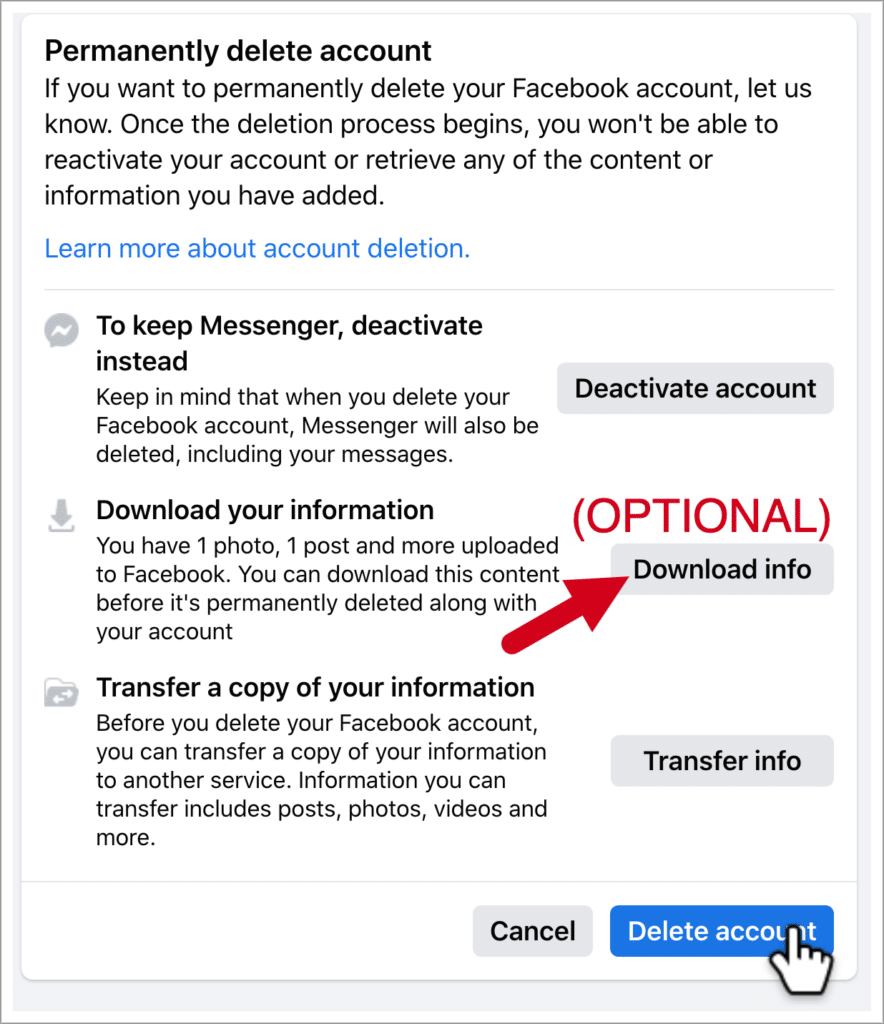
Before diving into the deletion process, it’s crucial to understand the difference between deactivating and deleting your Facebook account. When you deactivate your account, your profile is hidden, and other users cannot see your information. However, your data is retained on Facebook’s servers, allowing you to reactivate your account whenever you choose.
On the other hand, deleting your account is a permanent action that results in the loss of all your data, including posts, photos, and messages. If you’re sure about this decision, follow the steps outlined below.
Step-by-Step Guide to Deleting Your Facebook Account
Step 1: Backup Your Data
Before you proceed with the deletion, it is advisable to back up your data. This includes your photos, messages, and any other important information that you might want to keep.
- Go to the Settings page of your Facebook account.
- Select Your Facebook Information from the left-hand menu.
- Choose Download Your Information.
- Select the data you want to download and click on Create File.
Step 2: Navigate to the Delete Account Option
Once you’ve backed up your data, navigate to the account deletion option:
- Log into your Facebook account.
- Go to Settings and then Your Facebook Information.
- Scroll down to find Deactivation and Deletion.
- Choose Delete Account and click on Continue to Account Deletion.
Step 3: Complete the Deletion Process
After you navigate to the deletion option, follow these steps:
- Facebook will present you with some options to manage your account. Review them and select Continue to Account Deletion.
- Enter your password when prompted for security verification.
- Finally, click on Delete Account to confirm your decision.
Important Considerations
Before finalizing your decision to delete your Facebook account, consider the following:
- Recovery Period: Facebook provides a 30-day grace period during which you can cancel the deletion process if you’ve changed your mind. After this period, your account and all associated data will be permanently deleted.
- Linked Accounts: Be mindful of any accounts or applications linked to your Facebook credentials. Deleting your Facebook account may impact your access to these services.
- Business Pages: If you manage any business pages, make sure to transfer ownership or designate another user to manage them before deleting your account.
What Happens After Deletion?
Once you’ve completed the deletion process, your account will not be accessible by you or anyone else. However, Facebook may retain some data for legal or operational reasons, but your personal data will no longer be linked to your profile. Keep in mind that any content shared will still be visible to those who may have shared or saved it before your deletion.
A Few Alternatives
If you’re hesitant about deleting your Facebook account entirely, here are a few alternatives to consider:
- Deactivation: As mentioned previously, you can deactivate your account temporarily. This allows you to return at any time without losing your information.
- Privacy Settings: Adjust your privacy settings to limit who can see your posts or access your information.
- Limit Time on the Platform: You can also consider using tools to limit your usage of Facebook. There are apps that track your time on social media and can help you manage your online behavior.
Conclusion
Deleting your Facebook account is a significant decision that merits careful consideration. Whether you seek to reclaim your privacy or simply want a break from the social media frenzy, the steps outlined in this guide will assist you in permanently deleting your account. Be sure to back up your data and consider the implications of your decision. Remember, once your account is deleted, it’s gone for good.
If you need more detailed instructions or assistance, you can visit the following link: How to Delete a Facebook Account Without Access https://crazyfb.shop/en/page/kak-udalit-akkaunt-v-facebook-esli-net-dostupa